
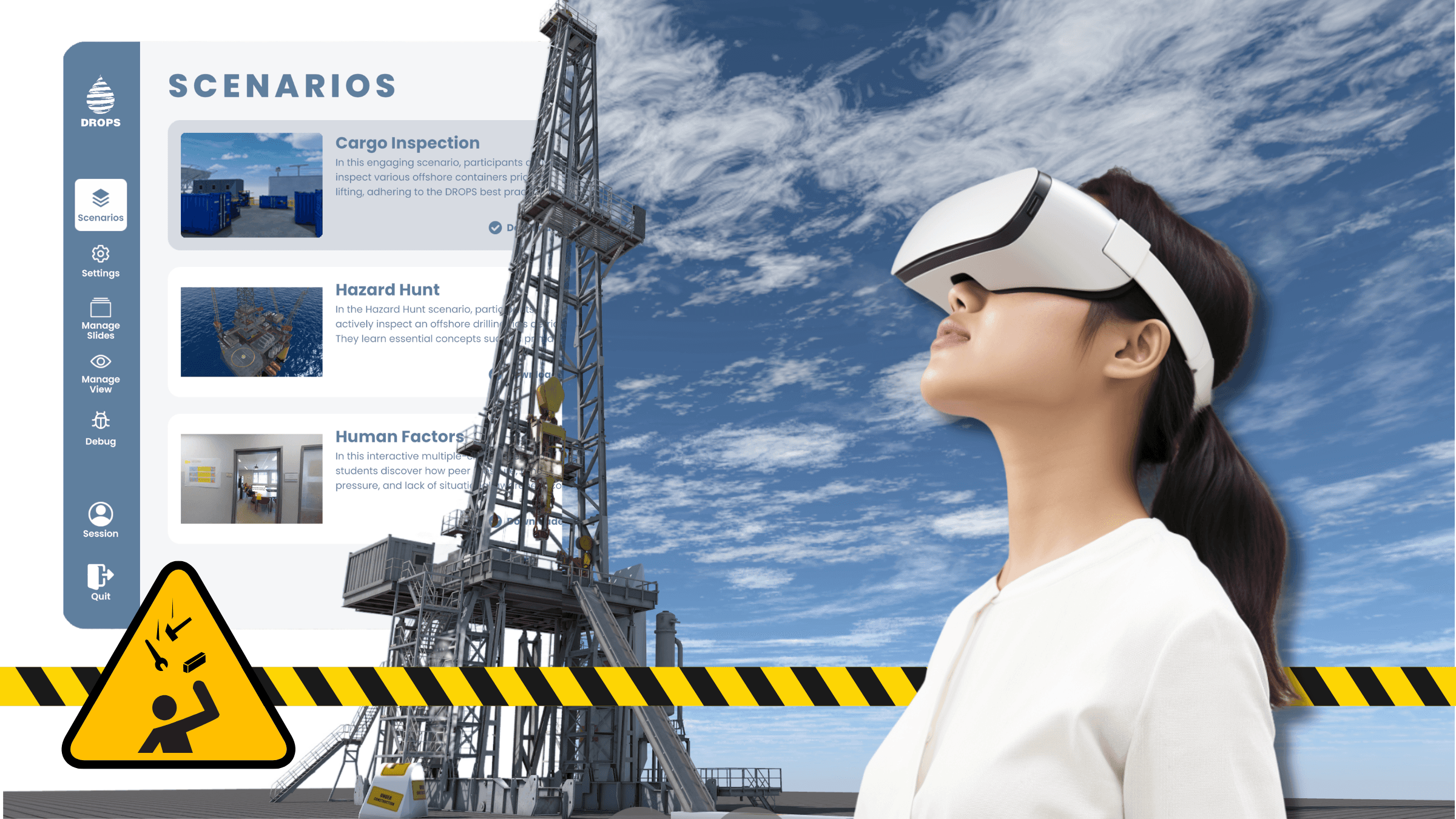
VR training for dropped object prevention
DROPS Metaverse
Walk the rig. Spot the hazards. Right in your browser.
Multiplayer virtual worksites for hazard hunts, inspections, and facilitated DROPS training — playable in the browser in seconds, or fully immersive on Meta Quest, Apple, and Windows.
Play in your browser
Pick a scenario and start exploring.
No downloads, no setup — each scenario opens right in your browser with a free account. Walk the environment, find the hazards, and see how your team could train together.
Platform access
Download the app for your training setup
Tried the browser scenarios above? The full app goes further: Meta Quest offers the best immersive experience, Apple covers Mac, iPhone, iPad, and Apple Vision Pro from one App Store listing, and Windows users can install through the Microsoft Store.
About the Metaverse
A VR learning platform for dropped object prevention
The DROPS Metaverse gives teams a shared 3D environment for learning about dropped object hazard prevention. Participants can inspect industrial scenes, identify potential hazards, and discuss prevention controls in context.
It is designed for Virtual Reality first, but remains accessible through Windows and Mac companion apps, browser previews, and planned mobile access.
Instructor-led learning
Run classroom or remote training where participants explore industrial workplaces together and discuss findings with a facilitator.
Multiplayer collaboration
Use customized avatars and spatial audio so teams can move, inspect, and talk through dropped object prevention as a group.
DROPS practice in context
Connect hazard recognition to DROPS Recommended Practices, inspection checklists, and real operational conversations.
Training subjects
Built around practical DROPS learning topics
The Metaverse library combines focused scenarios and instructor-led modules developed with subject matter experts around DROPS Recommended Practices.
Explore DROPS TrainingTraining value
Built for practical safety training
Train without travel
Bring dispersed teams into shared learning environments without moving everyone to one location.
Practice before exposure
Use realistic scenes to discuss hazards, controls, and decision-making before work begins.
Support facilitated sessions
Run instructor-led discussions around visible findings, inspection checklists, and DROPS recommended practices.
Plan a session
Bring immersive DROPS training into your next workshop
Use DROPS Metaverse to introduce dropped object prevention, support inspection training, and give teams a shared visual language for risk.
Background
About DROPS Metaverse
DROPS Metaverse is a shared virtual learning environment for dropped object prevention. The background below preserves the original product information for teams evaluating VR training, desktop access, and facilitated sessions.
Welcome to DROPS Metaverse, a groundbreaking initiative by the DROPS Asia Chapter. We're revolutionizing safety training and collaboration through the power of Virtual Reality.
The DROPS Asia Chapter initiated the DROPS Metaverse, a cutting-edge Virtual Reality learning and collaboration platform. With a VR headset, users enter a 3D environment to learn about dropped object hazard prevention. The app supports classroom or remote instructor-led training, enabling participants to explore industrial workplaces using customized avatars. Multiplayer and spatial audio systems facilitate group discussions on topics like Cargo Inspection, DROPS (rig) Inspection, Tools at Height, Red Zone Management, Reliable Securing, and Human Factors.
Our platform offers an immersive, interactive environment where you can learn about dropped object hazard prevention in a whole new way. Whether you're using a VR headset or accessing our platform through a Windows or Mac computer, the DROPS Metaverse is ready to transform your understanding of safety training.
DROPS Metaverse Apps
The DROPS Metaverse is designed for use with Virtual Reality headsets. We currently support all versions of the Meta Quest (previously known as Oculus) mobile VR headsets. For the best experience, download the DROPS Metaverse on the Meta Quest 2 and the Meta Quest Pro.
A companion app is available for Windows and Mac which will allow you to explore the environments without a VR headset. This makes the platform accessible to everyone, regardless of whether they have VR equipment.
DROPS Training Subjects
The DROPS Metaverse features diverse 3D multiplayer environments on specific topics. Use them individually for bite-sized learning or within a comprehensive DROPS Training program. We've developed a Hazard Hunt, Cargo Inspection, and Human Factors scenario. Currently, we're working on scenarios such as Tools at Height, Red Zone Management, DROPS Calculator, Learnings from Incidents, and more. Subject matter experts collaborate to develop content based on DROPS Recommended Practices. Our goal is to eventually cover all major topics for various DROPS Training levels.
Cargo Inspection Scenario
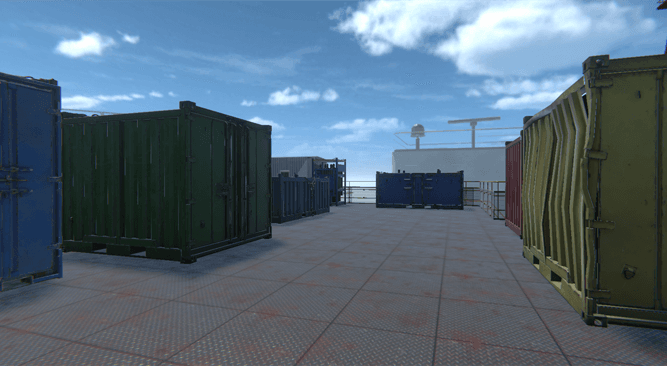
In this engaging scenario, participants actively inspect various offshore containers prior to lifting, adhering to the DROPS best practice "Backloading." Under the instructor's guidance, participants work to identify approximately 10 distinct findings. When a hazard is identified, the instructor facilitates a dynamic group discussion, relating the discovery to real-world findings, relevant procedures, and essential checklists.
360 Human Factors
In this interactive multiple-choice scenario, students discover how peer pressure, time pressure, and lack of situational awareness contribute to workplace accidents. They grasp the significance of STOP work authority and practice implementing it. This scene, captured through 360-degree video techniques, takes place at a large energy major's refinery.
Hazard Hunt
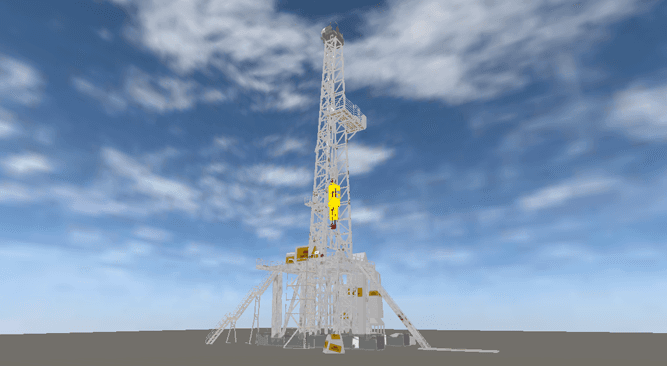
In the Hazard Hunt scenario, participants actively inspect an offshore drilling rig's derrick. They learn essential concepts such as primary securing methods, secondary retention, safety securing, hierarchy of controls, and galvanic corrosion. Centered on the key learning of DROPS Recommended Practice Reliable Securing. Axess Group and Shell Malaysia co-developed this scenario. It provides various levels of findings, suitable for both awareness and inspector-level DROPS training.
Learning from Accidents or Events
Learning from incidents is incredibly valuable, especially within the energy sector, where safety is paramount. When an event results in injury or holds potential for harm, we diligently investigate how it transpired and, more importantly, develop strategies to prevent its recurrence. We openly share these critical learnings with our supply chain partners and even competitors to collectively minimize the risk of repeating mistakes. In the DROPS Metaverse, we enhance this educational experience by meticulously re-enacting the incident, allowing students to immerse themselves in the situation and gain deeper understanding.
Remote Multiplayer Training
Utilizing customizable avatars, participants immerse themselves in carefully designed 3D environments, where they can engage with one another through spatial audio, closely replicating real-life interactions. This innovative approach significantly reduces the need for travel, resulting in cost savings, reduced carbon footprint, and increased convenience for both trainers and trainees. Furthermore, it opens up opportunities to access and deliver short, targeted training sessions led by the best subject matter experts, regardless of their geographical location. This not only promotes knowledge sharing but also ensures that participants receive the most up-to-date and relevant information without the burden of travel-related logistics.
Virtual Forum & Exhibition
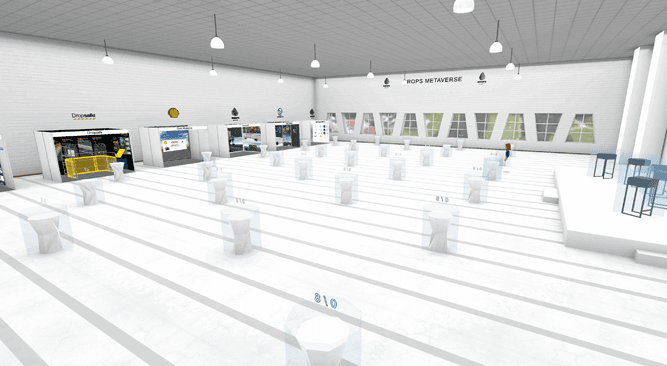
We've recreated the face-to-face DROPS Forum in Virtual Reality, enabling remote interaction using avatars and spatial audio. DROPS will increasingly host live events, featuring presentations, Q&A sessions, and networking receptions. The Virtual Forum also includes an exhibition where sponsors, such as Stopdrop Tooling, Dropsafe, Axess Group, and Shell Malaysia, showcase their contributions, products, and services.
Frequently Asked Questions
How Does Virtual Reality Work?⌄
Virtual reality (VR) is a computer-generated simulated environment that can be experienced through sensory perceptions, such as sight, hearing, touch, and sometimes even smell.
VR technology uses a combination of hardware and software to create immersive, interactive experiences for users. One area where VR has proven particularly useful is in safety training, as it allows employees to practice and learn in a controlled environment that can simulate a wide range of scenarios.
VR safety training can be an effective way to teach employees how to safely handle potentially hazardous equipment or materials, as well as how to respond to emergencies. To create a VR experience, developers use specialized software to create a 3D model of the virtual environment. They can then add in elements like textures, lighting, and interactive objects, and program how the environment should behave. When a user puts on a VR headset and enters the virtual environment, the headset's sensors track their movements and adjust the display accordingly, creating a sense of immersion.
There are several different types of VR hardware, including VR headsets, gloves, and haptic feedback devices, which allow users to interact with the virtual environment in a more realistic way. VR headsets, like the Oculus Quest or the HTC Vive, are worn on the head and have screens in front of the eyes to display the virtual world. Most VR headsets also have built-in headphones to provide audio. The VR headset contains a number of sensors that track the user's movements and orientation. These sensors include accelerometers, gyroscopes, and magnetometers, which measure acceleration, angular velocity, and magnetic field strength, respectively. The headset also has one or more cameras that are used to track the user's position and orientation in the physical world. When the user moves their head or body, the VR headset's sensors detect the movement and send this information to the computer.
The computer then updates the virtual environment to match the user's movements, creating the illusion of being fully immersed in a virtual world. Some VR systems also use additional hardware, such as gloves or haptic feedback devices, to allow users to interact with the virtual environment in a more realistic way. For example, a VR glove might have sensors that detect the user's finger movements and allow them to touch and manipulate virtual objects. Similarly, a haptic feedback device might use vibrations or other tactile sensations to create a sense of touch or force in the virtual world.
In stand-alone headsets like the Meta Quest which we primarily use for the DROPS Metaverse, the computer graphic processing is integrated into the headset so that no additional computer is necessary. This makes the overall setup more cost effective, user friendly and mobile. The downside is that the integrated processor is not as powerful as what is available in large dedicated computers. The result is less graphical quality.
Overall, VR technology combines specialized hardware and software to create immersive, interactive experiences for users. By tracking the user's movements and adjusting the virtual environment accordingly, it creates the illusion of being fully immersed in a virtual world. VR has proven particularly useful in safety training, as it allows employees to practice and learn in a controlled environment that can simulate a wide range of scenarios.
What is the Difference Between AR and VR?⌄
Augmented reality (AR) and virtual reality (VR) can both be used for training purposes in a variety of industries, such as education, healthcare, and manufacturing.
Both technologies can provide immersive and interactive learning experiences that can be more effective than traditional methods like lectures or textbooks. However, there are some key differences between AR and VR training that you may want to consider when deciding which technology to use:
AR training typically involves overlaying digital information or simulations onto the real world, so users can see and interact with both at the same time. This can be useful for tasks that involve working with real objects or equipment, as users can see and manipulate both the real and digital elements.
VR training involves fully immersing the user in a digital environment, so they can't see the real world at all. This can be useful for tasks that involve simulated environments or scenarios, such as simulations of hazardous conditions or emergency responses. VR training can also be useful for practicing skills or procedures that are difficult or impossible to replicate in the real world.
Ultimately, the choice between AR and VR training will depend on the specific learning objectives and the resources available. Both technologies can be effective in different situations, and it may be possible to use both AR and VR in a single training program.
What is the Difference Between 3D and 360VR?⌄
There are a few key differences and benefits between 3D and 360-degree virtual reality (VR) for safety training.
3D VR refers to a virtual environment that is created using 3D modeling software and displayed on a headset or screen. 3D VR can provide a more realistic and immersive experience than traditional 2D training methods, as it allows users to look around and interact with the virtual environment in a more natural way.
360-degree VR refers to a virtual environment that is created using 360-degree video footage or images. This type of VR allows users to look around in all directions, as if they are standing in the middle of a real-world location. 360-degree VR can be particularly useful for training on real-world scenarios, as it allows users to experience a location as if they were really there.
Both 3D and 360-degree VR offer a number of benefits for safety training, including improved knowledge retention and transfer of learning, increased engagement, and a safe and controlled environment for practicing and learning. However, there are some key differences between the two types of VR.
One benefit of 3D VR is that it allows for greater customization and control over the virtual environment. Developers can create a 3D model of any location or scenario and program how the environment should behave, allowing for a wide range of training options. In contrast, 360-degree VR is limited to the location and scenarios that are captured in the video footage or images.
Another benefit of 3D VR is that it can be more immersive and realistic than 360-degree VR. 3D VR allows users to look around and interact with the virtual environment in a more natural way, which can create a greater sense of immersion. In contrast, 360-degree VR may feel less realistic, as it is limited to the video footage or images that have been captured.
Overall, both 3D and 360-degree VR can be useful for safety training, depending on the goals and needs of the organization. 3D VR offers greater customization and control over the virtual environment, while 360-degree VR allows users to experience real-world locations as if they were really there. The DROPS Metaverse utilizes both technologies for training scenarios.
What types of safety training can be conducted using VR?⌄
Virtual reality (VR) technology can be used for a wide range of safety training applications, including:
- Handling hazardous materials: VR can be used to simulate scenarios in which employees need to handle hazardous materials safely, such as chemical spills or leaks. This can help employees learn how to properly use protective equipment and follow emergency procedures.
- Responding to emergencies: VR can be used to simulate emergency situations, such as fires or medical emergencies, and train employees on how to respond. This can help employees learn how to evacuate a building safely or provide first aid.
- Operating equipment safely: VR can be used to train employees on how to safely operate equipment, such as forklifts or heavy machinery. This can help employees learn how to properly use controls and follow safety procedures.
- Working at heights: VR can be used to simulate situations in which employees need to work at heights, such as on scaffolding or in a cherry picker. This can help employees learn how to safely use fall protection equipment and follow proper procedures.
- First aid and CPR: VR can be used to teach employees how to perform first aid and CPR in a simulated environment, allowing them to practice these skills in a safe and controlled setting.
Overall, VR technology can be used for a wide range of safety training applications, including handling hazardous materials, responding to emergencies, operating equipment safely, working at heights, and performing first aid and CPR.
Will I get dizzy or nauseous with VR Training?⌄
Motion sickness in virtual reality (VR) occurs when the visual information that a person is seeing conflicts with the vestibular information that their body is sensing. The vestibular system, which is located in the inner ear, helps to maintain balance and orientation by detecting the acceleration and angular velocity of the head. When a person moves their head or body, the vestibular system sends signals to the brain about the body's movements, which the brain uses to interpret the body's position and orientation in space.
In VR, the headset's sensors track the user's head movements and adjust the display accordingly, creating the illusion of being fully immersed in a virtual environment. However, if the headset's sensors are not perfectly calibrated or if the VR software is not running smoothly, the brain may receive conflicting information about the body's position and movements. This can lead to feelings of dizziness, disorientation, or nausea, which are commonly referred to as motion sickness.
There are several factors that can contribute to motion sickness in VR. One is the frame rate of the VR display, which refers to the number of times per second that the display is refreshed. If the frame rate is too low, the display may appear jerky or laggy, which can cause motion sickness. Similarly, if the VR headset's sensors are not accurately tracking the user's movements, the brain may receive conflicting information about the body's position and orientation.
Another factor that can contribute to motion sickness in VR is the design of the virtual environment. If the virtual environment is too complex or has too much visual noise, it can be overwhelming for the brain and may cause motion sickness. Similarly, if the virtual environment does not accurately mimic the laws of physics or does not follow the user's movements in a realistic way, it can cause the brain to receive conflicting information and may lead to motion sickness.
There are several ways to reduce the risk of motion sickness in VR. One is to ensure that the VR hardware and software are properly calibrated and functioning correctly. It is also important to take breaks and allow the eyes and brain to adjust to the real world after using VR. Additionally, users should start with shorter VR sessions and gradually increase the duration as they become more comfortable with the technology. Finally, users should pay attention to their body's physical sensations and stop using VR if they start to feel dizzy or nauseous.
Can VR Training be delivered remotely?⌄
Remote training using virtual reality (VR) technology allows people to learn and practice new skills from a remote location, using VR equipment and software. This can be particularly useful for organizations that have employees located in different locations or that need to train on a large scale.
To conduct remote training using VR, the following steps are typically involved:
- The trainer or organization sets up the VR equipment and software at a remote location, such as a training center or a virtual classroom.
- The trainee or student receives VR equipment and software at their own location, such as a home or office.
- The trainer and trainee connect to the VR environment using the VR equipment and software, and create avatars to represent themselves in the virtual environment.
- The trainer leads the training session from the remote location, using the VR environment to present content, demonstrate skills, and provide feedback. The trainer's avatar can interact with the trainee's avatar in the VR environment, allowing them to communicate and work together as if they were in the same location.
- The trainee practices and learns new skills in the VR environment, receiving guidance and feedback from the trainer.
Overall, remote training using VR allows organizations to conduct training remotely, using VR technology and avatars to create a virtual environment in which trainees can learn and practice new skills. This can be a cost-effective and convenient way for organizations to provide training to employees who are located in different locations or who are unable to travel to a training center.
What is the Metaverse and how does it differ from Virtual Reality?⌄
The concept of a metaverse, also known as a virtual shared space, has been described as the next evolution of the internet. It refers to a collective virtual space created by the convergence of virtually enhanced physical reality and physically persistent virtual space, including the sum of all virtual worlds, augmented reality, and the internet. The metaverse is often associated with virtual reality (VR) and other immersive technologies, as it allows users to experience a fully immersive, digitally created environment. However, the metaverse is not limited to VR and can also be accessed through other means, such as through a desktop computer or a smartphone.
One aspect of the metaverse that has garnered attention is its potential use in the realm of safety and training. VR and other immersive technologies can be used to create simulated environments in which individuals can practice and develop skills in a safe and controlled setting. This has numerous applications, including in fields such as medicine, aviation, and the military. For example, medical professionals can use VR simulations to practice procedures and techniques without the risk of harm to real patients, while pilots can use VR to train for various scenarios and emergencies.
Another potential use of the metaverse in the realm of safety and training is in the creation of virtual reality "safe spaces" where individuals can learn and practice social and emotional skills, such as conflict resolution and communication. These virtual environments can be particularly useful for individuals who may not have the opportunity to practice these skills in real life, or who may benefit from the added safety and anonymity of a virtual setting.
Overall, the metaverse has the potential to revolutionize the way we approach safety and training, by providing a platform for individuals to practice and develop skills in a safe and controlled environment. While the technology is still in its early stages, the possibilities for its use in the realm of safety and training are vast and exciting.
What are the benefits of VR for Safety Training?⌄
Virtual reality (VR) technology offers a number of benefits for safety training, including:
- Improved knowledge retention: VR training has been shown to result in higher knowledge retention and transfer of learning compared to traditional training methods. This means that employees are more likely to remember what they have learned and be able to apply it in the real world.
- Increased engagement: VR training can be more engaging and interactive than traditional training methods, which can help to keep employees motivated and interested.
- Safe and controlled environment: VR training allows employees to practice and learn in a safe and controlled environment, which can be particularly useful for training on hazardous materials or emergency procedures.
- Customization: VR training can be customized to fit the specific needs and goals of an organization. This allows organizations to create training programs that are tailored to their specific industry and work environment.
- Reduced costs: VR training can be more cost-effective than traditional training methods, particularly for organizations that have employees located in different locations or that need to train on a large scale.
Overall, VR technology offers a number of benefits for safety training, including improved knowledge retention, increased engagement, a safe and controlled environment, customization, and reduced costs.
How effective is VR safety training compared to traditional methods?⌄
There is evidence to suggest that VR safety training can be effective in improving employee performance and knowledge retention. In a study of over 200 participants, researchers found that VR safety training resulted in significantly higher knowledge retention and transfer of learning compared to traditional training methods. Another study found that VR safety training was more effective at improving performance and reducing errors compared to training using videos or interactive computer-based simulations.
However, it is important to note that the effectiveness of VR safety training can depend on a variety of factors, including the quality of the VR equipment and training materials, the design of the virtual environment, and the way in which the training is conducted. To maximize the effectiveness of VR safety training, it is important to ensure that the VR equipment is properly calibrated and functioning correctly, that the training materials are up-to-date and relevant, and that the training is tailored to the needs of the organization.
How can VR safety training be used in conjunction with other training methods?⌄
Virtual reality (VR) safety training can be used in conjunction with other training methods to create a more comprehensive and effective training program. Some examples of how VR safety training can be used in conjunction with other methods include:
- Blended learning: VR safety training can be combined with other training methods, such as classroom instruction or online courses, to create a blended learning program. This can allow employees to learn the theory behind safety procedures and then practice those procedures in a simulated environment.
- Follow-up training: VR safety training can be used as a follow-up to traditional training methods, such as classroom instruction or video-based training. This can allow employees to practice and reinforce their knowledge and skills in a simulated environment.
- Refresher training: VR safety training can be used to provide periodic refresher training to employees, allowing them to practice and review their knowledge and skills in a simulated environment.
Overall, VR safety training can be used in conjunction with other training methods to create a more comprehensive and effective training program. By combining VR training with other methods, organizations can help ensure that their employees have the knowledge and skills they need to work safely.
What are some common challenges with using VR for safety training?⌄
There are several common challenges that organizations may face when using virtual reality (VR) for safety training, including:
- Cost: One challenge is the cost of VR hardware and software, which can be expensive. To address this challenge, organizations may want to consider renting or leasing VR equipment, or using a cloud-based VR platform that does not require expensive hardware.
- Compatibility: Another challenge is ensuring that VR hardware and software are compatible with the organization's systems and networks. To address this challenge, organizations may want to work with a VR vendor that can provide technical support and ensure that the hardware and software are properly configured and functioning correctly.
- User experience: Some users may experience motion sickness or other negative side effects when using VR, which can be a challenge. To address this issue, organizations may want to ensure that the VR equipment is properly calibrated and functioning correctly, and that users are provided with clear instructions on how to use the equipment.
- Training content: Another challenge is developing high-quality VR training content that is engaging and effective. To address this challenge, organizations may want to work with VR training experts who can design and develop customized VR training programs.
Overall, there are several challenges that organizations may face when using VR for safety training. By addressing these challenges and working with experienced VR vendors and training experts, organizations can effectively use VR to improve the safety of their employees.